Excel 2007 are intarzieri la deschidere fisiere din retea

03/10/2018

HENCE, MY SOLUTION FOR THIS PROBLEM IS JUST INSTALL AN ADD-IN OF EXCEL 2007. You did not need to install all add-ins. Just install only one add-in and see the effect.

How to install Add-in in MS Excel

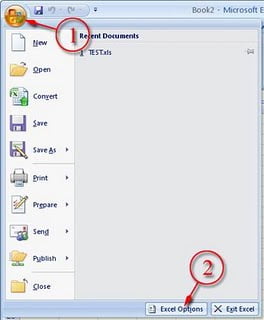
1. Click the ball office logo at the top-left of the program
2. Click button “Excel Option”

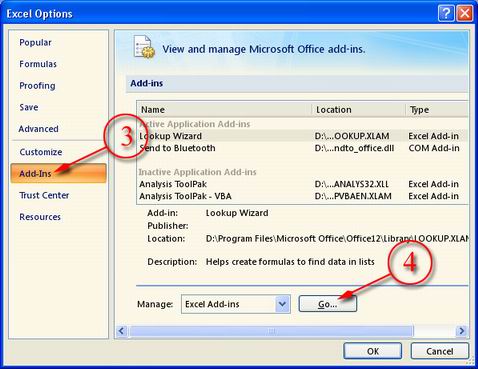
3. Select item “Add-Ins”
4. Select “Excel Add-Ins” in Manage list box and click button “Go…”

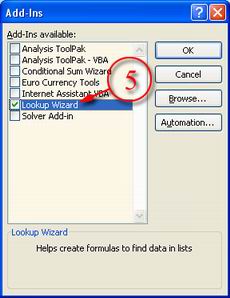
5. Tick the add-ins that you want and click button “OK”

HQ LEVEL presteaza servicii profesionale de service si mentenanta pentru calculatoare cu backup-ul si recuperarea datelor. Detalii…

Suntem aici. Contacteaza-ne.

Ne puteti gasi la sediile noastre din Timisoara si Bucuresti, sau ne puteti contacta pe e-mail sau telefonic.
Timisoara
Sf. Ap. Petru si Pavel nr. 29/C

Lu-VI 8:00-17:00


Bucuresti
Barlea nr.5-13, Sector 5

Lu-VI 8:00-17:00
Servicii IT
Servicii HVAC
Imagine HQ Level Business Services

Copyright © 2026 HQ Level Business Services

Grupul HQ Level

Site-urile noastre specializate pe zone și servicii

Scrie-ne pe WhatsApp 0740 227 701
Acest site este protejat de reCAPTCHA și se aplică Politica de confidențialitate și Termenii Google.